
Features
Everything Alumbus does.
A forecasting tool, not a bookkeeping app. You tell it what repeats, confirm a real balance now and then, and it fills in the rest.
The forecast
Every day ahead, worked out
The calendar shows what goes in, what goes out and the balance you are left with at the end of each day. Swipe between months; tap a day to see exactly what falls on it.
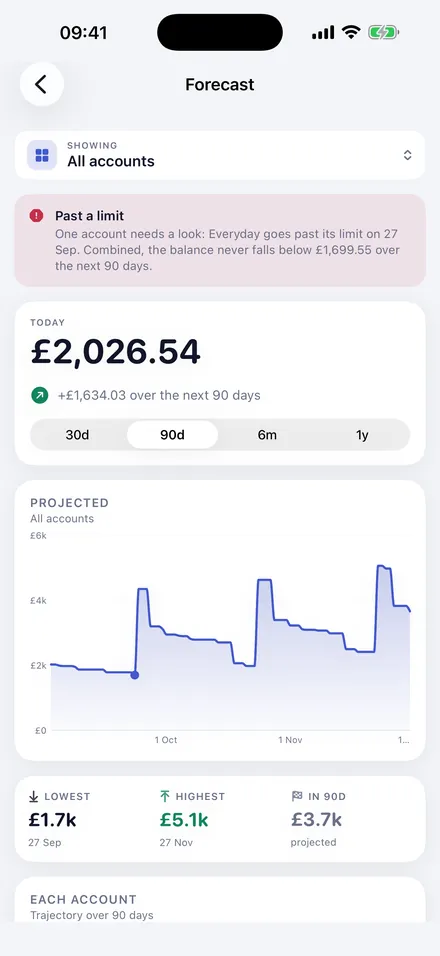
The forecast view charts where a balance goes over 30 days, 90 days, six months or a year, with the lowest and highest points and the days they fall on, and a trajectory for each account underneath.
Warnings tell you when an account is forecast to cross a warning level you set, or to go past an arranged overdraft or credit limit — with the date and the figure, days or weeks ahead.
Accounts
Everything you hold, and everything you owe
Accounts and groups
Current accounts, savings, credit cards, loans. Group them — “Everything at the bank”, “What I owe” — and see any group’s combined position.
Amount owed, not a minus sign
Credit cards and loans can display as an amount owed rather than as a negative number, which is how a statement puts it and how most people think about it.
Multi-currency
Each account keeps its own currency. Combined totals convert through a reference rate you control; an account with no rate is left out of a total rather than silently mis-added.
One curve each, not one lump
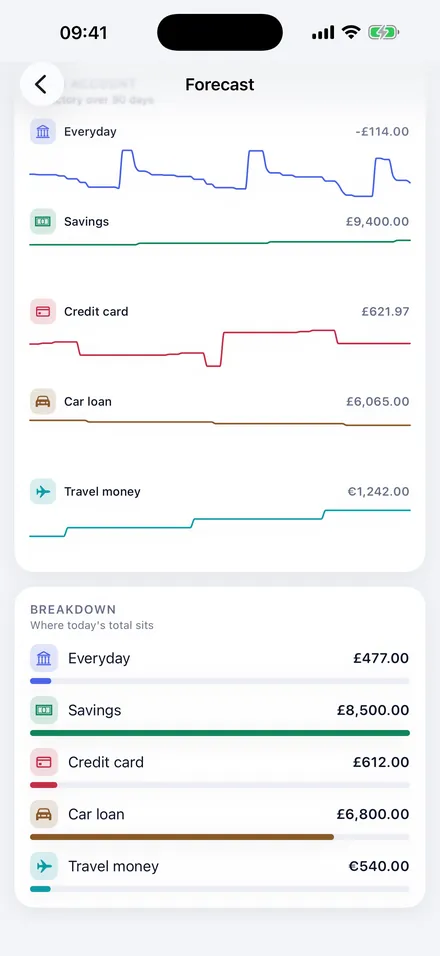
Under the combined chart, every account gets its own line over the same period, with where it ends. A savings account climbing while a current account sinks is two different facts, and a single total hides both.
Underneath that, a breakdown of where today’s total actually sits.
What you plan
Enter it once
Planned transactions
Income, expenses and transfers between accounts, with real recurrence: weekly, monthly, yearly, day-of-month with month-end clamping, and weekend rules.
Skip a single occurrence, or override one, without disturbing the rest of the series.
Balance transfers
A transfer whose amount is what another account owes — pay off whatever the card owes on the statement before payday.
It reads the balance on the day the statement is cut, not the day the money moves.
Confirmed balances
Whenever you check your bank, tell Alumbus the figure. It shows the difference against what it expected and restarts the forecast from your number, so small errors never pile up.
Credit cards
The repayment calculator
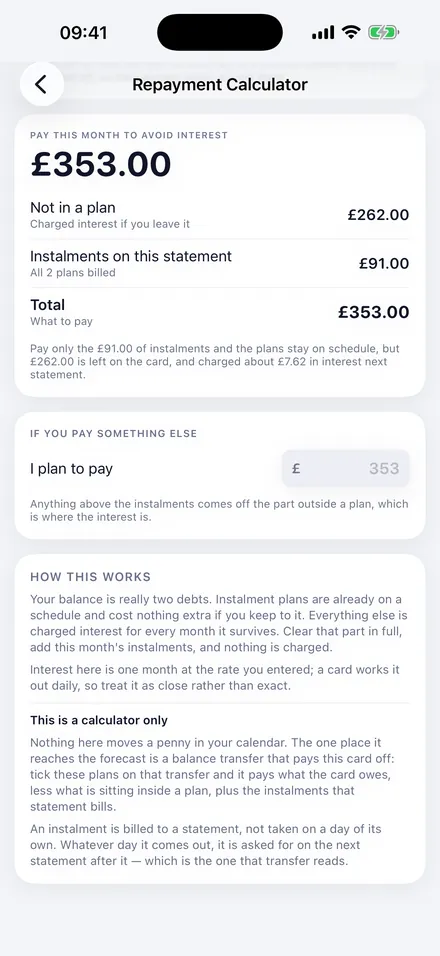
A credit-card balance is really two debts: instalment plans already on a schedule, and the revolving balance charged interest every month it survives.
Paying the whole balance clears the plans early for nothing. Paying the minimum leaves the expensive part earning interest. Alumbus works out the figure in between, and shows each plan’s statement-by-statement schedule.
It is a calculator only — it moves nothing in your calendar. The one place it reaches the forecast is a balance transfer that pays a card off, where you can tick which plans that transfer settles.
Your setup
The rest of it
Multiple profiles
Separate sets of books — personal and a side business, say — each with its own accounts, its own colour, and its own optional Face ID lock.
Face ID lock
Optional. Locks Alumbus whenever it goes to the background. The app is told only whether authentication succeeded; your biometric data stays with the device.
Notifications
Optional local reminders before a forecast breach, and a nudge when an account has gone too long without a confirmed balance. No push service is used.
Backups and exports
Write a backup file you control. Export planned transactions, balance history or the day-by-day forecast as CSV.
Light and dark
Follows the system, or pin it either way. Each profile carries its own accent colour through the whole app.
Example data
A complete set of accounts and plans you can load on first run to see what a filled-in forecast looks like, and clear again whenever you like.
Privacy
Built so there is nothing to leak
No account, no sign-in, no server. No bank connections, ever. Your figures stay on your device. No analytics, advertising or trackers. Nothing is sold or shared.
Apart from Apple’s App Store checking your plan, the only network request Alumbus makes is optional, and carries nothing but currency codes, to fetch published exchange rates. Turn automatic updates off and it makes none at all.
And what it is not
- iPhone only. It requires iOS 17 or later.
- It is paid for: free for 2 weeks, then a subscription or a one-off purchase.
- It is not financial advice, and it is not regulated. It projects figures you enter.
- It does not connect to banks, so balances are confirmed by you rather than fetched.
Pricing
Free for 2 weeks. Then your choice.
Start with a 2-week free trial on either subscription, or buy Alumbus outright. Every plan is the whole app — nothing is held back.
Monthly
£0.99/month
2 weeks free, then billed monthly. Cancel any time.
Best value
Yearly
£9.99/year
2 weeks free, then billed once a year. Cancel any time.
Lifetime
£14.99once
One payment. Yours to keep, with nothing to renew.
UK prices, including VAT. Other countries are charged the App Store’s equivalent in local currency, shown in the app before you confirm. The free trial is available once per Apple Account. Subscriptions renew automatically unless cancelled at least 24 hours before the end of the period; manage or cancel them in your iPhone’s Settings. Payments and refunds are handled by Apple.